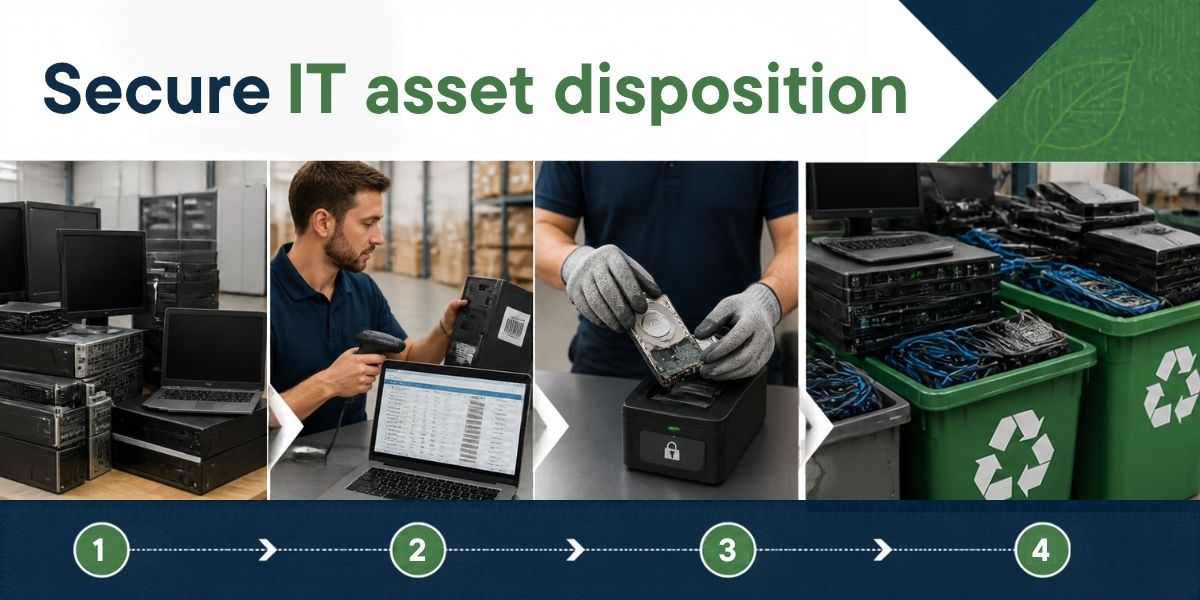
Replacing old computers and servers is usually planned well in advance. A business decides what equipment it needs, purchases new devices, and moves employees onto the updated systems. But what happens to the old equipment once it is no longer in use?
For many organisations, this is where the process becomes less organised. Retired laptops may sit in storage, old servers may remain in a back room, and equipment scheduled for disposal may be handed over without a clear record of what happened to it.
The problem is that an unused device is not necessarily an empty or harmless device. It may still contain confidential files, customer information, login credentials, or business records. It may also contain components that need to be handled responsibly when the equipment reaches the end of its useful life.
This is why businesses need a secure IT Asset Disposition (ITAD) strategy. A well-planned approach helps organisations manage retired IT equipment, protect sensitive information, maintain asset records, and direct equipment towards appropriate reuse or recycling channels.
What Is IT Asset Disposition (ITAD)?
IT Asset Disposition, commonly known as ITAD, is the process of managing IT equipment when an organisation no longer needs it. This may involve assessing the equipment, preparing it for reuse, sanitising stored data, arranging resale or redeployment where appropriate, and sending unsuitable equipment for responsible recycling.
ITAD can cover laptops, desktop computers, servers, storage devices, networking equipment, printers, and other business technology.
The process is broader than simply removing old computers from an office. It considers what happens to each asset after retirement, including the security of its data and the appropriate handling of its physical components.
For example, a company replacing 200 employee laptops may have devices in different conditions. Some could be suitable for reuse after appropriate checks, while others may be damaged or no longer practical to repair. A secure ITAD process identifies these differences and establishes a suitable route for each asset.
Businesses can learn more about this approach through IT Asset Disposition services.
Why Do Businesses Need a Secure ITAD Strategy?
1. To Protect Confidential Business Data
Data security is one of the most important reasons to establish a formal ITAD process.
Computers and storage devices can contain customer records, employee details, financial information, contracts, internal communications, and other confidential material. Servers and networking equipment may also hold configuration files, credentials, or information about an organisation’s systems.
Deleting files does not necessarily remove all recoverable data. Formatting a drive or performing a factory reset may also be insufficient for some devices or security requirements.
A secure ITAD strategy establishes how data-bearing equipment will be handled before it leaves the organisation’s control. Depending on the device and its intended next use, this may involve an appropriate data sanitisation method or physical destruction of the storage media.
The business should also decide who authorises the process and what evidence must be retained.
This is particularly relevant for organisations handling customer information, financial records, confidential projects, or other sensitive business data.
2. To Maintain Control Over Retired IT Assets
Businesses often track computers and other devices while they are being used, but asset visibility can decline once equipment is marked for retirement.
A laptop might be transferred to another department, placed in storage, sent for repair, or collected for disposal. Without an updated record, it can become difficult to establish where the device went or whether the planned action was completed.
A secure ITAD strategy extends asset tracking to the end of the equipment’s useful life.
Useful records may include the asset tag, serial number, assigned department, physical condition, retirement date, data sanitisation status, and final disposition. The exact information required depends on the organisation’s policies and operational needs.
This creates a clearer record for IT teams, procurement departments, finance teams, and internal auditors. It also helps organisations identify equipment that can be redeployed instead of purchasing replacements unnecessarily.
3. To Reduce the Risk of Improper Disposal
Retired IT equipment should not automatically be treated as ordinary scrap.
Computers, servers, monitors, circuit boards, and other electronic products contain materials that may be recovered through appropriate recycling processes. Some components also require careful handling.
If equipment is discarded through unsuitable channels, materials may be wasted and potentially hazardous components may be handled improperly.
A secure ITAD strategy includes an appropriate end-of-life route for each asset. Working equipment may be suitable for reuse or refurbishment, while equipment that cannot reasonably be reused should be directed towards suitable recycling or treatment.
Businesses can connect this part of the process with broader e-waste management services, particularly when they are retiring equipment in large quantities.
4. To Improve Accountability and Documentation
When an organisation retires IT assets, it should be able to answer some straightforward questions.
Which devices were collected? Was the required data sanitisation completed? Which equipment was reused, and which items went for recycling? Is there evidence of the handover and final processing?
Without suitable documentation, these questions may require time-consuming follow-ups across several teams or service providers.
A documented ITAD process helps establish responsibilities and maintain a record of the actions taken. Depending on the arrangement, useful documents may include asset inventories, collection receipts, transfer records, data sanitisation reports, and recycling documentation.
Businesses should agree on the records they need before equipment is handed over. They should also check that any certificates or reports supplied accurately describe the work performed.
Documentation is not just paperwork. It helps the organisation understand whether its disposal process is operating as intended.
5. To Support Better Financial Decisions
Not every retired computer has reached the end of its practical life.
Some devices may still meet the requirements of another department, while others may be suitable for refurbishment or resale. A secure ITAD process can help businesses assess these options before sending equipment for recycling.
This matters because the decision to replace a device and the decision to dispose of it are not always the same.
For example, a laptop that no longer meets the requirements of a software development team might still be suitable for a less demanding administrative role, provided it meets the organisation’s security and technical requirements.
A structured assessment can help identify such opportunities. It can also help businesses plan equipment retirement more consistently and understand the costs associated with collection, data sanitisation, transport, and recycling.
Any financial recovery should be evaluated against the equipment’s actual condition, market value, processing costs, and security requirements rather than assumed in advance.
How Does a Secure ITAD Process Work?
A practical ITAD strategy should be clear enough for employees and IT teams to follow. Although the exact process varies by organisation, it generally includes these stages.
Step 1: Identify and Record the Assets
Create a list of equipment scheduled for retirement. Record available asset tags, serial numbers, locations, device types, and condition.
This inventory establishes what needs to be handled and reduces the risk of equipment being overlooked.
Step 2: Assess Equipment for Reuse or Recycling
Determine whether each device can be redeployed, repaired, refurbished, or sent for recycling.
The assessment should consider technical condition, business requirements, security concerns, and the cost of further use. Equipment should not be reused simply because it still powers on.
Step 3: Establish Data Handling Requirements
Identify which assets contain storage media or other sensitive information. Decide on a suitable sanitisation or destruction method based on the device, data sensitivity, and intended next use.
Where required, retain evidence that the agreed process has been completed.
Step 4: Arrange Secure Collection and Transfer
Prepare equipment for collection, maintain the relevant asset records, and agree on suitable transportation and handover arrangements.
Batteries, damaged devices, and equipment requiring special handling should be identified in advance.
Step 5: Complete the Final Disposition
Route assets towards their approved destination. Depending on their condition and the agreed process, this may involve redeployment, refurbishment, resale, dismantling, or recycling.
The final status should be recorded rather than leaving assets marked as pending indefinitely.
Step 6: Review Records and Close the Process
Reconcile the original inventory against the final disposition records. Investigate missing assets, incomplete data handling, or discrepancies in the documentation.
This final check helps the organisation confirm that the planned process has been completed.
Common ITAD Mistakes Businesses Should Avoid
Even organisations with established IT departments can overlook important details when equipment is retired.
Assuming deletion means secure data removal: Standard file deletion does not necessarily satisfy data sanitisation requirements. Choose an appropriate method for the storage media and its intended next use.
Leaving retired devices untracked: Equipment placed in storage can be forgotten or transferred without proper authorisation. Keep asset records updated until the final disposition is confirmed.
Using price as the only selection criterion: A low-cost disposal arrangement is not automatically the most suitable. Consider data security, handling procedures, relevant authorisations, downstream destinations, and documentation.
Mixing reusable equipment with waste: Devices that could be redeployed should be assessed separately from equipment that is damaged or unsuitable for further use.
Accepting documentation without checking its scope: Confirm what each report or certificate represents. Do not assume a document proves data destruction or recycling unless it actually covers that activity.
Waiting until an office upgrade begins: Planning ITAD only after replacement equipment arrives can create storage, scheduling, and security problems. Include asset disposition in the upgrade plan from the beginning.
Best Practices for Building a Secure ITAD Strategy
A useful ITAD policy does not need to be complicated, but it should establish clear responsibilities.
Start by defining when an asset is considered retired and who can approve its disposal. Assign responsibility for inventory updates, data sanitisation, collection arrangements, and recordkeeping.
Next, establish data handling requirements based on the sensitivity of the information and the type of storage device. Ensure that equipment is not released until the required security checks have been completed.
Choose service providers carefully. Ask how assets will be identified, transported, assessed, and processed. Check relevant registrations or authorisations where applicable, and establish which records will be supplied.
It is also worth reviewing the process periodically. Changes in technology, internal security policies, equipment volumes, and business locations can affect how IT assets should be retired.
Finally, include ITAD in procurement and replacement planning. When organisations plan for the end of an asset’s life at the time of purchase, they are better positioned to manage retirement in an orderly way.
When Should a Business Consider Professional ITAD Services?
Professional support can be especially useful when an organisation is retiring a large number of computers, replacing servers or storage systems, relocating an office, or disposing of equipment containing sensitive information.
It may also help when a company needs a more consistent asset inventory, documented handovers, secure data handling, or a suitable route for equipment that cannot be reused.
Before engaging a provider, businesses should clarify the scope of work. Ask which activities are included, how data-bearing devices will be handled, where the equipment will go, and what evidence will be provided. Verify the provider’s relevant registrations and capabilities rather than relying on broad assurances.
BRP Infotech offers IT Asset Disposition services for businesses exploring a structured approach to retired IT equipment. Organisations can review the service details and assess whether the available scope aligns with their operational and security requirements.
Conclusion
A secure ITAD strategy helps businesses manage the final stage of an IT asset’s life with the same care given to its purchase and use.
It brings together data protection, asset tracking, equipment assessment, documentation, and responsible recycling. Without a defined process, retired devices can become an overlooked security concern or an unmanaged source of electronic waste.
Businesses do not need to wait for a major technology upgrade to improve their approach. Starting with a reliable inventory, clear data handling rules, and a documented disposal process can make a meaningful difference.
If your organisation is planning to retire computers, servers, or other IT equipment, BRP Infotech’s IT Asset Disposition services provide a starting point for discussing a more organised approach to end-of-life IT assets.
7. FAQs
1. What is a secure ITAD strategy?
A secure ITAD strategy is a documented process for retiring IT equipment while protecting stored data, tracking assets, assessing opportunities for reuse, and ensuring appropriate final handling or recycling.
2. Why is IT Asset Disposition important for businesses?
ITAD helps businesses maintain control over retired equipment, protect sensitive information, improve disposal records, identify reusable assets, and manage electronic waste responsibly.
3. Is deleting files enough before disposing of a computer?
Not necessarily. Ordinary deletion and formatting may not meet the organisation’s data security requirements. An appropriate data sanitisation method or physical destruction of storage media may be necessary, depending on the device and circumstances.
4. Which devices should be included in an ITAD process?
Common examples include laptops, desktop computers, servers, storage drives, networking equipment, printers, and other business IT assets. Organisations should also identify batteries and other components that require separate handling.
5. How can businesses choose an ITAD service provider?
Review the provider’s relevant capabilities, registrations or authorisations, data handling procedures, collection arrangements, downstream processing routes, and documentation. Confirm the scope of work before transferring equipment.
6. What documentation should businesses maintain during IT asset disposal?
Depending on internal policies and applicable requirements, records may include asset inventories, collection receipts, transfer records, data sanitisation reports, and recycling documentation. The records should accurately reflect the activities completed.
7. How does ITAD support responsible e-waste management?
ITAD helps identify equipment that can be reused or refurbished and directs unsuitable equipment towards appropriate recycling or treatment channels. This can help reduce unnecessary disposal and improve asset traceability.